Notifications tab
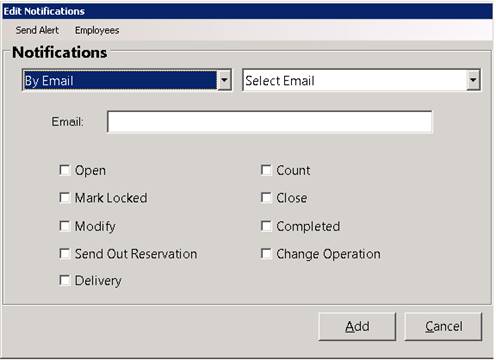
Contract Notifications: Under the Notifications Tab, you can add or modify notifications for this contract. You select how the person will receive the notification; By Email, By Text Message, or By Interoffice Mail. You then select what things that you want to notify such as when the contract is Opened, Mark Locked, Modified, Sent Out, Closed, etc. Then whenever one of the checked events occurs for that contract, the specified person will be sent the message. If the notification method is Email, a PDF of the contract will also be attached.
*Note: (a) You can have an unlimited number of contacts per contract. (b) Open/Closed notificatins will not be sent for continuation billed contracts.
The notification setup screen looks like this
* Notifications will be sent to customer when the contract has been routed through dispatch center. Under the Parameters, Customer Tab, you can check the box for next day confirmation by set time.
ex. if time was set to 5 pm, then all confirmed routes for tomorrow will send notifications. (contracts mush have delivery notifications set).